CWP-2 Web Client aka CWP-2 Remote

Quote from Code Wizard on 2025-07-08, 18:14Let's talk about CWP-2 Remote. What features would you like to see, what bugs have been found, what should be improved or what should be added?
As soon as I finish with the final tests and all the necessary functions, an online service for calculating codes will be published, with all available CODE and EEPROM algorithms in the CWP-2 Application. This will be a fully paid service, even the algorithms are free in the application, they will require a minimum payment of 1 token, so that there is no big load on the server. But, you can use the published CWP-2 Web Client and its source code as you want with your CWP-2 Key. It is meant for professional use and nothing else. Before doing anything, please read the F.A.Q. section. In the meantime, I want to get a little feedback on what has already been done.
The first questions are:
- Do you need a configuration file with a port number and other options?
- Do you want a password protected server?
- Anything else?
An update will be released in the next 24 hours with the following improvements:
- Additional checks for request message format for Server mode and Web Client
- Queue support to Web Client, all calculation requests are executed sequentially with concurrent requests
- Verbose logging of requests and responses, as well as remote IP address in Web Client
- Raw response for GET requests in Developer mode for Web Client
- Dump file upload, to use EEPROM calculator over the Internet from a web browser
Thank you
Let's talk about CWP-2 Remote. What features would you like to see, what bugs have been found, what should be improved or what should be added?
As soon as I finish with the final tests and all the necessary functions, an online service for calculating codes will be published, with all available CODE and EEPROM algorithms in the CWP-2 Application. This will be a fully paid service, even the algorithms are free in the application, they will require a minimum payment of 1 token, so that there is no big load on the server. But, you can use the published CWP-2 Web Client and its source code as you want with your CWP-2 Key. It is meant for professional use and nothing else. Before doing anything, please read the F.A.Q. section. In the meantime, I want to get a little feedback on what has already been done.
The first questions are:
- Do you need a configuration file with a port number and other options?
- Do you want a password protected server?
- Anything else?
An update will be released in the next 24 hours with the following improvements:
- Additional checks for request message format for Server mode and Web Client
- Queue support to Web Client, all calculation requests are executed sequentially with concurrent requests
- Verbose logging of requests and responses, as well as remote IP address in Web Client
- Raw response for GET requests in Developer mode for Web Client
- Dump file upload, to use EEPROM calculator over the Internet from a web browser
Thank you
Quote from Code Wizard on 2025-07-09, 17:37So, yesterday the new version came out. I hope everyone liked it. And while I'm waiting for your feedback, here is a small list of what will be added to the external settings file in the future releases:
; CWP2_Remote.ini - Configuration for Code Wizard Pro 2 Remote Server

[network]
listen_port = 49374 ; Port to bind the HTTP server to
bind_address = 0.0.0.0 ; 127.0.0.1 = localhost only, 0.0.0.0 = all interfaces
max_connections = 10 ; Max simultaneous HTTP connections
request_timeout = 5000 ; Timeout for calculator response (ms)
client_idle_timeout = 120 ; Disconnect idle clients after N seconds (0 = disabled)

[security]
require_password = 0 ; 1 = enable login screen before access
password_hash = ; Optional: SHA256 hash of password (hex) or use HTTP Basic Auth
auth_user = admin ; HTTP Basic Auth username
auth_pass = secret123 ; HTTP Basic Auth password
csrf_protection = 1 ; 1 = enable anti-CSRF token checks

auth_max_attempts = 5 ; Max failed login attempts before blocking IP
auth_block_seconds = 60 ; IP block duration after failed attempts

ip_whitelist = 127.0.0.1,192.168.0.0/24 ; Allowed IPs (empty = allow all)
ip_blacklist = 10.0.0.5,172.16.0.0/16 ; Blocked IPs (checked before whitelist)

[paths]
log_path = %APPDATA%\Code Wizard Pro 2\remote.log
dump_log_path = ; Optional: separate log for uploaded dumps
dump_dir = %APPDATA%\Code Wizard Pro 2\dumps
html_root = . ; Optional: external folder for HTML/CSS/JS overrides

[logging]
log_mode = both ; file / console / both / off
log_level = info ; debug / info / error
log_max_size = 1048576 ; Max log file size in bytes before rotating
log_rotate = 1 ; 1 = enable rotation when max size is reached
log_auth_attempts = 1 ; 1 = log successful and failed login attempts

[limits]
enable_uploads = 1 ; 1 = enable dump upload
max_dump_size = 8388608 ; Max size of uploaded dump in bytes (e.g. 8MB)
dump_retention_days = 7 ; Auto-delete dumps older than N days (0 = keep all) or
dump_cleanup_interval = 86400 ; Interval (in seconds) to scan and purge old dumps

[options]
auto_restart = 1 ; 1 = restart server on fatal error (e.g. pipe crash)
archive_dumps = 0 ; 1 = zip and archive old dumps before deletion

[ui]
default_mode = user ; dev / user (mode shown on startup)
enable_dev = 1 ; 1 = allow switching to developer mode
ui_theme = dark ; dark / light
Do you want anything else, or this is more than enough? )
So, yesterday the new version came out. I hope everyone liked it. And while I'm waiting for your feedback, here is a small list of what will be added to the external settings file in the future releases:
; CWP2_Remote.ini - Configuration for Code Wizard Pro 2 Remote Server

[network]
listen_port = 49374 ; Port to bind the HTTP server to
bind_address = 0.0.0.0 ; 127.0.0.1 = localhost only, 0.0.0.0 = all interfaces
max_connections = 10 ; Max simultaneous HTTP connections
request_timeout = 5000 ; Timeout for calculator response (ms)
client_idle_timeout = 120 ; Disconnect idle clients after N seconds (0 = disabled)

[security]
require_password = 0 ; 1 = enable login screen before access
password_hash = ; Optional: SHA256 hash of password (hex) or use HTTP Basic Auth
auth_user = admin ; HTTP Basic Auth username
auth_pass = secret123 ; HTTP Basic Auth password
csrf_protection = 1 ; 1 = enable anti-CSRF token checks

auth_max_attempts = 5 ; Max failed login attempts before blocking IP
auth_block_seconds = 60 ; IP block duration after failed attempts

ip_whitelist = 127.0.0.1,192.168.0.0/24 ; Allowed IPs (empty = allow all)
ip_blacklist = 10.0.0.5,172.16.0.0/16 ; Blocked IPs (checked before whitelist)

[paths]
log_path = %APPDATA%\Code Wizard Pro 2\remote.log
dump_log_path = ; Optional: separate log for uploaded dumps
dump_dir = %APPDATA%\Code Wizard Pro 2\dumps
html_root = . ; Optional: external folder for HTML/CSS/JS overrides

[logging]
log_mode = both ; file / console / both / off
log_level = info ; debug / info / error
log_max_size = 1048576 ; Max log file size in bytes before rotating
log_rotate = 1 ; 1 = enable rotation when max size is reached
log_auth_attempts = 1 ; 1 = log successful and failed login attempts

[limits]
enable_uploads = 1 ; 1 = enable dump upload
max_dump_size = 8388608 ; Max size of uploaded dump in bytes (e.g. 8MB)
dump_retention_days = 7 ; Auto-delete dumps older than N days (0 = keep all) or
dump_cleanup_interval = 86400 ; Interval (in seconds) to scan and purge old dumps

[options]
auto_restart = 1 ; 1 = restart server on fatal error (e.g. pipe crash)
archive_dumps = 0 ; 1 = zip and archive old dumps before deletion

[ui]
default_mode = user ; dev / user (mode shown on startup)
enable_dev = 1 ; 1 = allow switching to developer mode
ui_theme = dark ; dark / light
Do you want anything else, or this is more than enough? )
Quote from Code Wizard on 2025-07-21, 19:08New version of CWP-2 Remote released, including sources - CWP2_Server.zip
What's new:
- Added script to run CWP-2 Calculator in Server mode with CWP-2 Remote and Cloudflare tunnel if available for remote access via LAN or Internet
- Added server restart option, network and security settings to the configuration file for CWP-2 Remote and additional logging of uploaded files, authorization attempts
- Added additional checks for incompatible browsers for Developer and User modes of CWP-2 Remote
The following options are now available in CWP2_Remote.ini:
; CWP2_Remote.ini - Configuration for Code Wizard Pro 2 Remote Server

[network]
listen_port = 49374 ; Port to bind the HTTP server to
bind_address = 127.0.0.1 ; 127.0.0.1 = localhost only, 0.0.0.0 = all interfaces
max_connections = 10 ; Max simultaneous HTTP connections (maps to num_threads)
request_timeout = 15000 ; Timeout for calculator response (ms)
enable_keep_alive = yes ; Allow persistent HTTP connections (yes/no)
check_tunnel_host = cwp2.net ; Hostname or domain to verify external tunnel (e.g. CloudFlare tunnel)
check_tunnel_interval = 0 ; Interval in seconds between tunnel availability checks (0 = disabled)

[security]
require_password = 0 ; 1 = enable login screen before access
auth_user = admin ; HTTP Basic Auth username
auth_pass = secret123 ; HTTP Basic Auth password
csrf_protection = 1 ; 1 = enable anti - CSRF token checks
auth_max_attempts = 5 ; Max failed login attempts before blocking IP
auth_block_seconds = 60 ; IP block duration after failed attempts
ip_whitelist = 127.0.0.1, 192.168.0.1 ; Allowed IPs (empty = allow all)
ip_blacklist = 10.0.0.5, 172.16.0.13 ; Blocked IPs (checked before whitelist)

[options]
auto_restart = 1 ; 1 = restart server on fatal error (e.g. pipe crash)
New version of CWP-2 Remote released, including sources - CWP2_Server.zip
What's new:
- Added script to run CWP-2 Calculator in Server mode with CWP-2 Remote and Cloudflare tunnel if available for remote access via LAN or Internet
- Added server restart option, network and security settings to the configuration file for CWP-2 Remote and additional logging of uploaded files, authorization attempts
- Added additional checks for incompatible browsers for Developer and User modes of CWP-2 Remote
The following options are now available in CWP2_Remote.ini:
; CWP2_Remote.ini - Configuration for Code Wizard Pro 2 Remote Server

[network]
listen_port = 49374 ; Port to bind the HTTP server to
bind_address = 127.0.0.1 ; 127.0.0.1 = localhost only, 0.0.0.0 = all interfaces
max_connections = 10 ; Max simultaneous HTTP connections (maps to num_threads)
request_timeout = 15000 ; Timeout for calculator response (ms)
enable_keep_alive = yes ; Allow persistent HTTP connections (yes/no)
check_tunnel_host = cwp2.net ; Hostname or domain to verify external tunnel (e.g. CloudFlare tunnel)
check_tunnel_interval = 0 ; Interval in seconds between tunnel availability checks (0 = disabled)

[security]
require_password = 0 ; 1 = enable login screen before access
auth_user = admin ; HTTP Basic Auth username
auth_pass = secret123 ; HTTP Basic Auth password
csrf_protection = 1 ; 1 = enable anti - CSRF token checks
auth_max_attempts = 5 ; Max failed login attempts before blocking IP
auth_block_seconds = 60 ; IP block duration after failed attempts
ip_whitelist = 127.0.0.1, 192.168.0.1 ; Allowed IPs (empty = allow all)
ip_blacklist = 10.0.0.5, 172.16.0.13 ; Blocked IPs (checked before whitelist)

[options]
auto_restart = 1 ; 1 = restart server on fatal error (e.g. pipe crash)
Quote from Code Wizard on 2025-08-12, 10:50While I'm working on implementing JSON to CWP-2 Remote, in addition to the already added User and Developer modes, you can add external JSON support right now using PHP or any other solution, as I did for debugging - GET for CODE calculator and multipart for EEPROM calculator in dev mode - http://localhost:49374/?mode=dev
External PHP implementation of JSON for CODE & EEPROM Calculators (sample 1):
External PHP implementation of JSON for CODE & EEPROM Calculators (sample 2):
New version of CWP-2 Remote released, including sources - CWP2_Server.zip
While I'm working on implementing JSON to CWP-2 Remote, in addition to the already added User and Developer modes, you can add external JSON support right now using PHP or any other solution, as I did for debugging - GET for CODE calculator and multipart for EEPROM calculator in dev mode - http://localhost:49374/?mode=dev
External PHP implementation of JSON for CODE & EEPROM Calculators (sample 1):
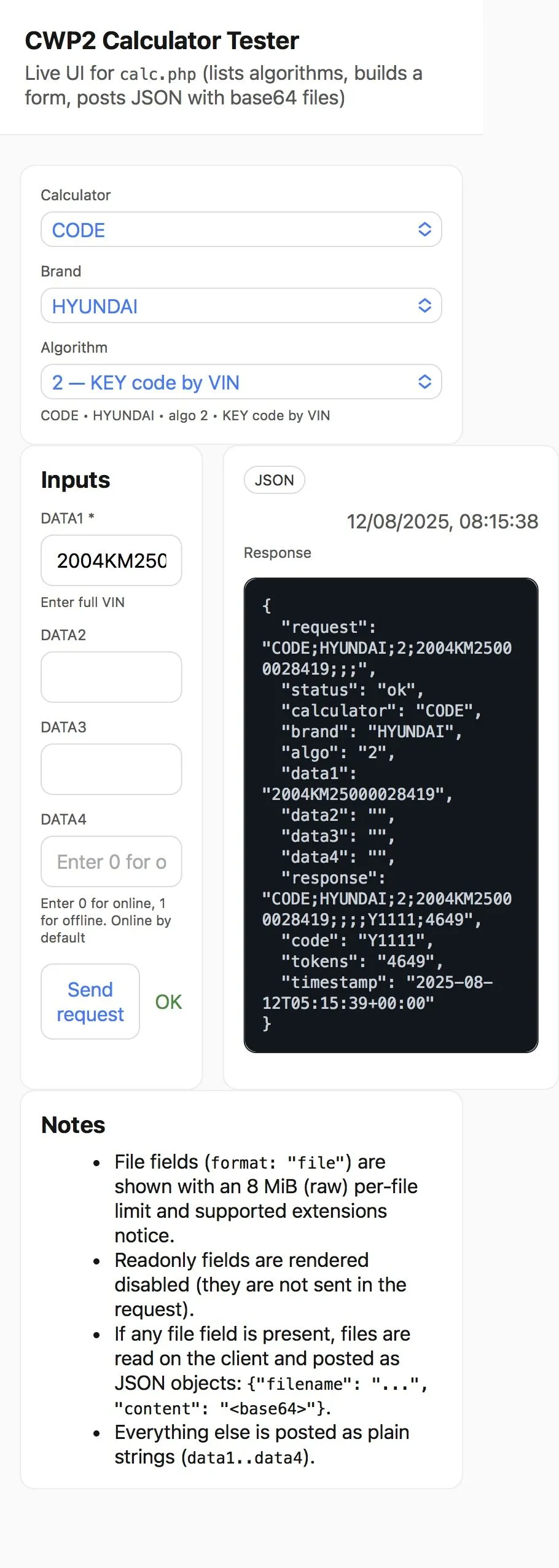
External PHP implementation of JSON for CODE & EEPROM Calculators (sample 2):

New version of CWP-2 Remote released, including sources - CWP2_Server.zip