CWP-2 Portal - Automated Calculation Service with Client Accounts

Quote from Code Wizard on 2026-06-17, 20:08I'm planning to release the sequel to CWP-2 Remote soon — CWP-2 Portal. I'd like to do additional testing before release, so I'm publishing the beta version here. It's fully functional and you can use it for its intended purpose - https://calc.cwp2.net/. I want to hear your feedback - what should be changed, added, or fixed.
CWP-2 Portal is a self-hosted web application that turns your existing CWP-2 setup into a fully automated calculation service. Your clients register, top up their credit balance, submit requests through a browser — and receive results instantly, without any manual involvement on your part. Built directly on top of CWP-2 Remote, it requires no modifications to your current installation.
How It Works
Portal is the missing front-end layer between your clients and the CWP-2 calculation engine. The request chain is straightforward:
- Client — opens the portal in a web browser (HTTPS)
- CWP-2 Portal — PHP + SQLite: handles accounts, billing, history and the admin panel
- CWP-2 Remote — your existing C web server (JSON API on localhost:49374)
- CWP-2 App — the calculation engine + dongle (tokens / credits)
Each step is handled automatically: Portal takes the client's request, forwards it to CWP-2 Remote via its existing JSON API, receives the result, deducts credits from the client's balance, and stores the transaction in the history log. You set the prices — Portal handles the rest.
CWP-2 Remote is used as-is — no modifications required to your existing installation.
What Your Clients Get
A complete self-service experience — no need to contact you for each calculation.
- 🔐 Account & Login — email + password registration. Optional invite-only mode for controlled access during early rollout.
- 💳 Credit Balance — top up via Stripe or PayPal. Current balance always visible. Automatic notification when balance runs low.
- ⚙️ Calculation Form — dynamic form built from your live CWP-2 algorithm list. Fields adapt per algorithm: VIN, EEPROM file, key data, etc.
- 📋 Request History — complete log of all calculations: date and time, algorithm used, result, and credits spent per request.
- 🔔 Notifications — in-app alerts for low balance, account activity, and system messages from the admin.
- 👤 Profile — password change and account settings, accessible from any device with a browser.
Flexible Per-Algorithm Pricing
You decide what each calculation costs. Prices are defined as rules with wildcard support — by algorithm ID, brand, and online/offline mode. Rules are evaluated top-to-bottom; first match wins.
Algorithm ID Mode Credits Description KIA_SMARTRA3 Online 10 Specific algorithm rule TOYOTA_* Any 5 All Toyota algorithms *_EEPROM Offline 1 All EEPROM offline calculations * Any 1 Default fallback — everything else Rule changes take effect immediately — no restart required.
Admin Panel
Full control over users, pricing, payments, and system settings — all accessible from your browser.
Users
- View all registered accounts
- Manually adjust credit balance
- Block or unblock access
- Delete accounts
Pricing
- Add, edit, delete pricing rules
- Wildcard algorithm matching
- Per-mode pricing (Online / Offline)
- Live changes, no restart
Payments
- Stripe Checkout + Webhooks
- PayPal Orders API
- 10 supported currencies
- Full transaction log
Settings
- Portal name and currency
- Invite-only registration toggle
- CWP-2 Remote URL and connection test
- Per-user request throttle
Invites
- Generate invite codes
- One-time use, controlled access
- Useful for private beta rollout
Notifications
- Alert on new user registration
- CWP-2 token balance warnings
- Mark read / clear all
Installation — 3 Steps, Under 2 Minutes
Distributed as a ready-to-run archive for Windows. No server setup. No system-wide PHP installation. Everything is included.
- Extract the archive — unpack into any folder, for example alongside your CWP-2 installation directory.
- Run
_install.cmd— downloads portable PHP 8.3 via PowerShell (available on all Windows 10/11 systems). No admin rights required, no changes to your system.- Run
_start.cmd— opens the Setup Wizard in your browser. Five steps: connect to CWP-2 Remote, choose currency, enter Stripe/PayPal API keys, create your admin account, done.Optional: Public access via Cloudflare Tunnel. Place
cloudflared.exein the folder and_start.cmdwill launch the tunnel automatically, giving you a public HTTPS address with no port forwarding and no static IP required. Works without it too, for local network use.Updates are applied by running
_update.cmd— it replaces application files while leaving your config and database untouched.
Join the Beta Test
CWP-2 Portal is in active development. If you're already running CWP-2 Calculator with CWP-2 Remote and are interested in offering paid calculation services to your own clients — we'd like to hear from you.
Portal is free for CWP-2 license holders — you profit from the calculations, not from the software itself.
Requirements to participate:
- Active CWP-2 dongle (Security Key with tokens/credits)
- CWP-2 Remote up and running on your machine
- Interest in reselling calculations to your own customers
- Willingness to test and share feedback
Reply in this thread or send a private message. Beta testers get early access to new features and a direct channel to development.
I'm planning to release the sequel to CWP-2 Remote soon — CWP-2 Portal. I'd like to do additional testing before release, so I'm publishing the beta version here. It's fully functional and you can use it for its intended purpose - https://calc.cwp2.net/. I want to hear your feedback - what should be changed, added, or fixed.
CWP-2 Portal is a self-hosted web application that turns your existing CWP-2 setup into a fully automated calculation service. Your clients register, top up their credit balance, submit requests through a browser — and receive results instantly, without any manual involvement on your part. Built directly on top of CWP-2 Remote, it requires no modifications to your current installation.
How It Works
Portal is the missing front-end layer between your clients and the CWP-2 calculation engine. The request chain is straightforward:
- Client — opens the portal in a web browser (HTTPS)
- CWP-2 Portal — PHP + SQLite: handles accounts, billing, history and the admin panel
- CWP-2 Remote — your existing C web server (JSON API on localhost:49374)
- CWP-2 App — the calculation engine + dongle (tokens / credits)
Each step is handled automatically: Portal takes the client's request, forwards it to CWP-2 Remote via its existing JSON API, receives the result, deducts credits from the client's balance, and stores the transaction in the history log. You set the prices — Portal handles the rest.
CWP-2 Remote is used as-is — no modifications required to your existing installation.
What Your Clients Get
A complete self-service experience — no need to contact you for each calculation.
- 🔐 Account & Login — email + password registration. Optional invite-only mode for controlled access during early rollout.
- 💳 Credit Balance — top up via Stripe or PayPal. Current balance always visible. Automatic notification when balance runs low.
- ⚙️ Calculation Form — dynamic form built from your live CWP-2 algorithm list. Fields adapt per algorithm: VIN, EEPROM file, key data, etc.
- 📋 Request History — complete log of all calculations: date and time, algorithm used, result, and credits spent per request.
- 🔔 Notifications — in-app alerts for low balance, account activity, and system messages from the admin.
- 👤 Profile — password change and account settings, accessible from any device with a browser.
Flexible Per-Algorithm Pricing
You decide what each calculation costs. Prices are defined as rules with wildcard support — by algorithm ID, brand, and online/offline mode. Rules are evaluated top-to-bottom; first match wins.
| Algorithm ID | Mode | Credits | Description |
|---|---|---|---|
| KIA_SMARTRA3 | Online | 10 | Specific algorithm rule |
| TOYOTA_* | Any | 5 | All Toyota algorithms |
| *_EEPROM | Offline | 1 | All EEPROM offline calculations |
| * | Any | 1 | Default fallback — everything else |
Rule changes take effect immediately — no restart required.
Admin Panel
Full control over users, pricing, payments, and system settings — all accessible from your browser.
Users
- View all registered accounts
- Manually adjust credit balance
- Block or unblock access
- Delete accounts
Pricing
- Add, edit, delete pricing rules
- Wildcard algorithm matching
- Per-mode pricing (Online / Offline)
- Live changes, no restart
Payments
- Stripe Checkout + Webhooks
- PayPal Orders API
- 10 supported currencies
- Full transaction log
Settings
- Portal name and currency
- Invite-only registration toggle
- CWP-2 Remote URL and connection test
- Per-user request throttle
Invites
- Generate invite codes
- One-time use, controlled access
- Useful for private beta rollout
Notifications
- Alert on new user registration
- CWP-2 token balance warnings
- Mark read / clear all
Installation — 3 Steps, Under 2 Minutes
Distributed as a ready-to-run archive for Windows. No server setup. No system-wide PHP installation. Everything is included.
- Extract the archive — unpack into any folder, for example alongside your CWP-2 installation directory.
- Run
_install.cmd— downloads portable PHP 8.3 via PowerShell (available on all Windows 10/11 systems). No admin rights required, no changes to your system. - Run
_start.cmd— opens the Setup Wizard in your browser. Five steps: connect to CWP-2 Remote, choose currency, enter Stripe/PayPal API keys, create your admin account, done.
Optional: Public access via Cloudflare Tunnel. Place cloudflared.exe in the folder and _start.cmd will launch the tunnel automatically, giving you a public HTTPS address with no port forwarding and no static IP required. Works without it too, for local network use.
Updates are applied by running _update.cmd — it replaces application files while leaving your config and database untouched.
Join the Beta Test
CWP-2 Portal is in active development. If you're already running CWP-2 Calculator with CWP-2 Remote and are interested in offering paid calculation services to your own clients — we'd like to hear from you.
Portal is free for CWP-2 license holders — you profit from the calculations, not from the software itself.
Requirements to participate:
- Active CWP-2 dongle (Security Key with tokens/credits)
- CWP-2 Remote up and running on your machine
- Interest in reselling calculations to your own customers
- Willingness to test and share feedback
Reply in this thread or send a private message. Beta testers get early access to new features and a direct channel to development.
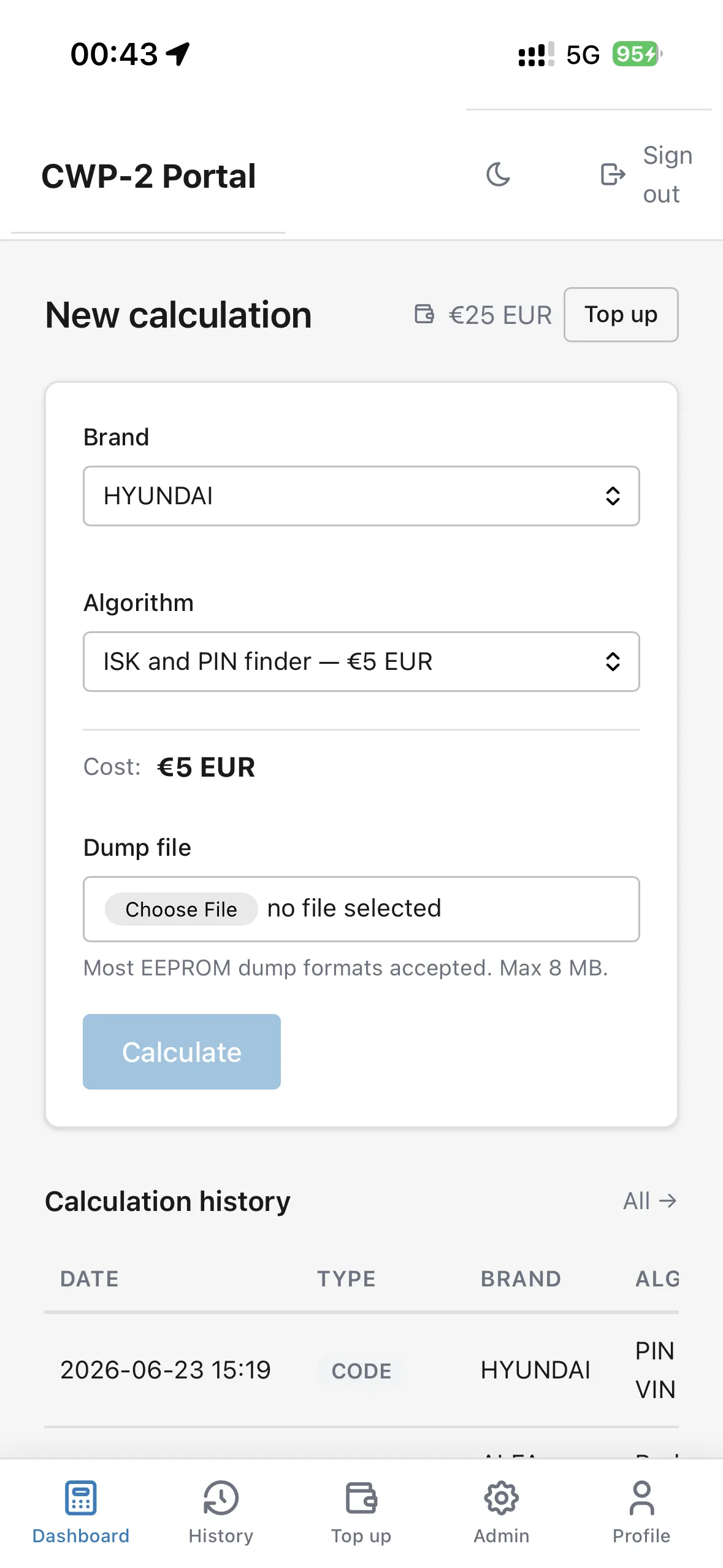
Quote from Code Wizard on 2026-06-24, 00:03CWP-2 Portal - Dashboard (PWA / mobile app):
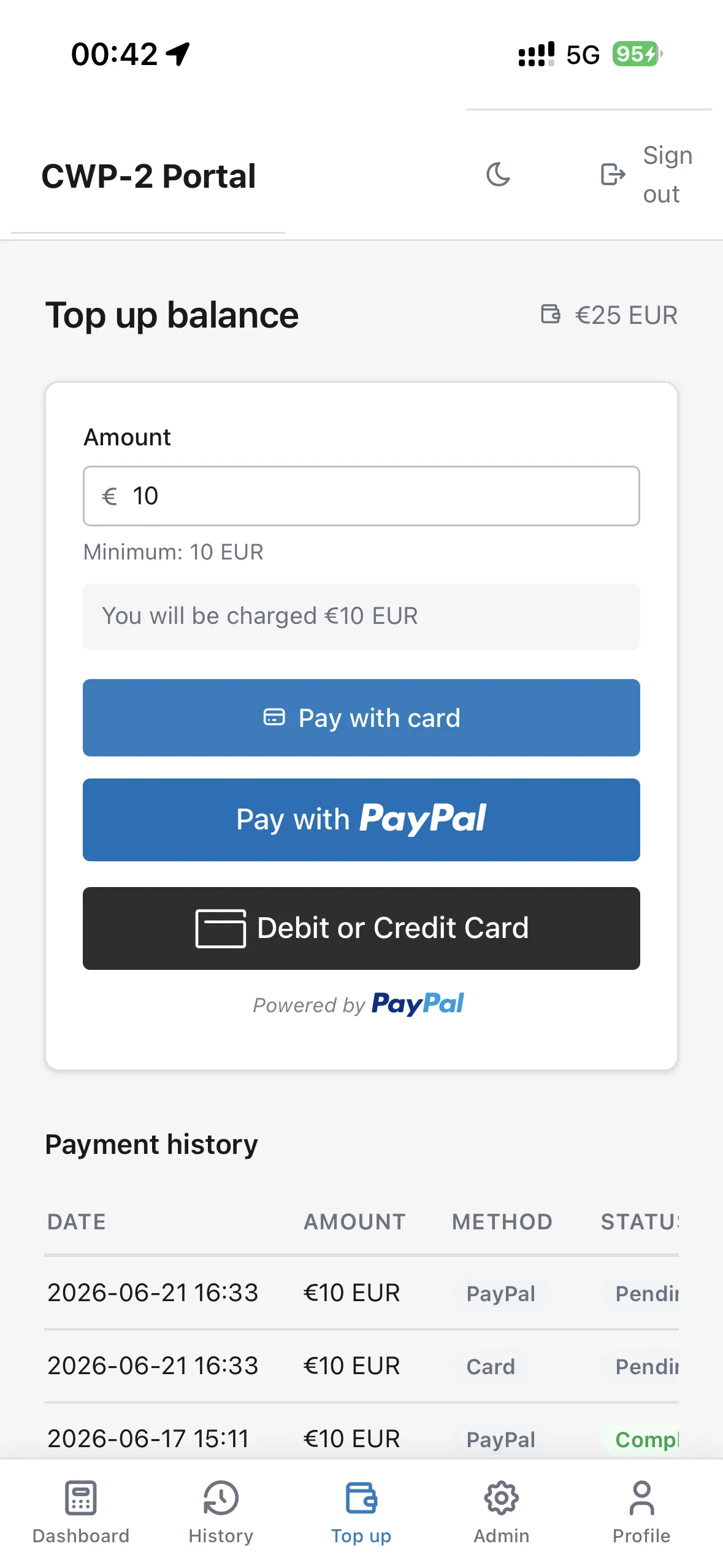
CWP-2 Portal - Top Up (PWA / mobile app):
Try it now — the beta version is already online (this instance is still being refined).
CWP-2 Portal - Dashboard (PWA / mobile app):
CWP-2 Portal - Top Up (PWA / mobile app):
Try it now — the beta version is already online (this instance is still being refined).